
XC Spec AQ Indoor Display
CO2 sensors are used to control ventilation systems and monitor indoor air quality. They can be stand-alone sensors or integrated into thermostats or air quality monitoring platforms.
Learn MoreIf you are experiencing issues with the comparison tool, please disable your adblocker.
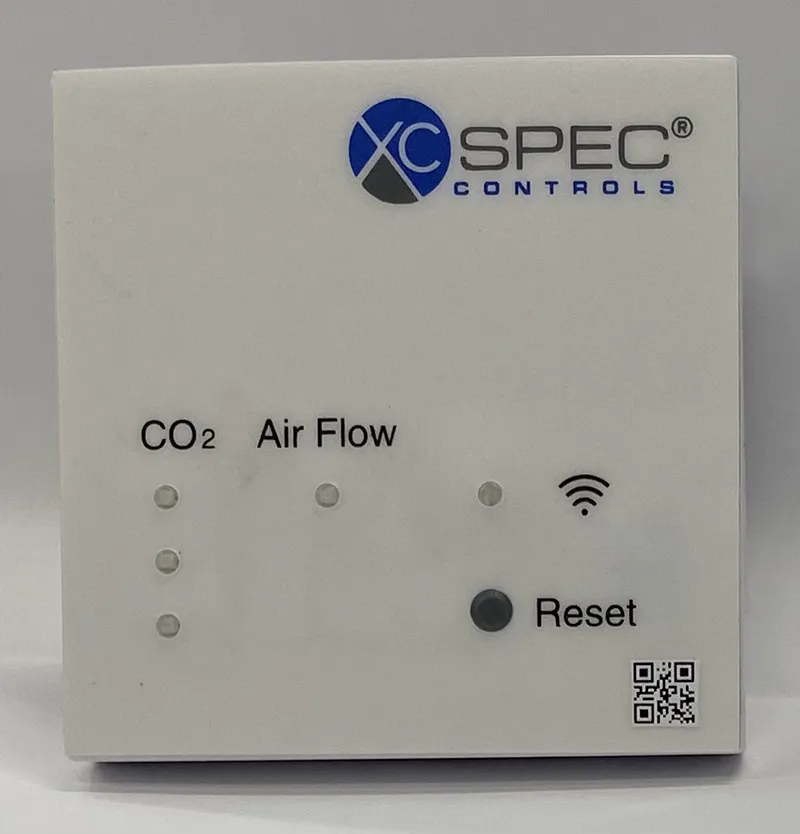
XC Spec AQ Indoor Display
Carbon dioxide sensor for long term monitoring and demand control ventilation.
Hub Highlights:
- Three color LEDs indicate CO2 range. Display of CO2 value publicly accessible through mobile app.
- Easily connected to any building automation system for monitoring or ventilation control
- Good performance on Hub CO2 accuracy testing protocols
- Includes temperature and humidity sensors
Last Edited on: 6/26/2025
| Sensor Type | Non-dispersive infrared (NDIR) Manufacturer: Sensirion |
| Power Input | 24 VAC/VDC |
| Outputs | Wifi to cloud-based interface (requires gateway) |
| Altitude Correction Method | Automatic via pressure sensor |
| Measurement Range | 400-10,000 ppm |
| Reported Accuracy | ± (30 ppm + 3% of reading) |
| Display of C02 Value | Web (account required) |
| Uses Automatic Background Calibration (ABC) | Yes |
| Model | AQ Indoor Display |
| Date of Test | November 29-December 6, 2023 |
| Sample Size | 5 |
|
Error of CO2 measurement @1100 ppm (average) (ppm)
|
110 |
|
Error of CO2 measurement @ 1100 ppm (standard deviation) (ppm)
|
39 |
|
Accuracy Metric
|
less than ±125ppm |
|
Noise of CO2 measurement @1100 ppm (Average) (ppm)
|
3 |
|
CO2 Full results
|
See Box Plot |
| Operating Power for Sensor (watts) | 0.92 |
| Operating Power for Gateway (watts) | NA |
|
Operating Power for Sensor + Gateway (watts)
|
0.92 |
|
Operating Power Metric
|
less than ±1 W |
| Maximum Number of Sensors per Gateway | NA |
Data Collection
Sample Size
5
Data Source: Staff at the UC Davis Western Cooling Efficiency Center
User interface
1. Can the sensor display the CO2 level to occupants? If yes describe.
Yes - Live readings and graph of historical data available through webpage, account required. Must connect sensor to local wifi. Display also available on iOS or Android app, no account required.
User interface
2. Can the sensor display a visual indicator to occupants that the CO2 level has exceeded a programmed threshold? If yes, describe (what does the indicator look like, what the default thresholds are, and can the threshold be changed).
Yes - Built-in LED turns green when CO2 is below the low setpoint (600 ppm by default), red when CO2 is above the high setpoint (800 ppm by default), and orange when CO2 is between the two setpoints. Setpoints are configurable on webpage associated with sensor.
Reporting capabilities
3. Can the sensor alert facilities (such as an email, text, or call phone application) when the CO2 level has exceeded a programmed threshold? If yes, describe (what does the indicator look like and can the threshold be changed).
Yes - Email alerts are configurable on mobile app.
Integration capabilities
4. Can the CO2 sensor interface with a building automation system (BAS) or demand control ventilation (DCV) system controller? If yes, describe if integration capabilities are vendor specific.
Yes - 0-10V or 2-10V DCV output and XC Spec BAS
Integration capabilities
5. If sensor can interface with a BAS or DCV system controller, is additional hardware required?
No
Reporting capabilities, Integration capabilities
6. How can the CO2 sensor data be logged? If proprietary software, describe (what type of account is needed, what logging intervals are available, what does it look like, and describe its capabilities including data download capabilities).
Logged data available through webpage as .csv download. Data logged every 30 seconds. Phone app also allows viewing limited historical data in a table. Max CO2 concentration for the past five occupied periods is available.
Installation
7. Does the sensor require specialized software for installation? If yes, describe.
Yes - Requires logging into a local wifi portal to configure.
Installation
8. Does the sensor require specialized training for installation? If yes, describe.
No
Operation
9. Does the sensor require on-going maintenance? If yes, describe.
No
Operation
10. Does the sensor require service contracts for ongoing data access? If yes, describe.
No
Miscellaneous
11. Are there any other notes about the user experience?
N/A